SUMEXT FOR STUDIOS, AGENCIES & CONSULTANTSClient hours.
Client hours.
Supplier bills.
Bring billable time and business paperwork into a reviewable routine that fits how your practice keeps its books.
Sample records · review before accounting NORTHSIDE STUDIOIllustrative interface
THIS WEEK · SAMPLE TIME
2to reviewFind the next item to check.
Harbour projectStudio design · Monday
6.0 hoursDraft entry
Cedar Print StudioCP-1049 · Supplier bill
AED 315.00Needs review
Sample only · no live accounting changes
THE PRODUCT, IN CONTEXT
Keep project time and purchase records close
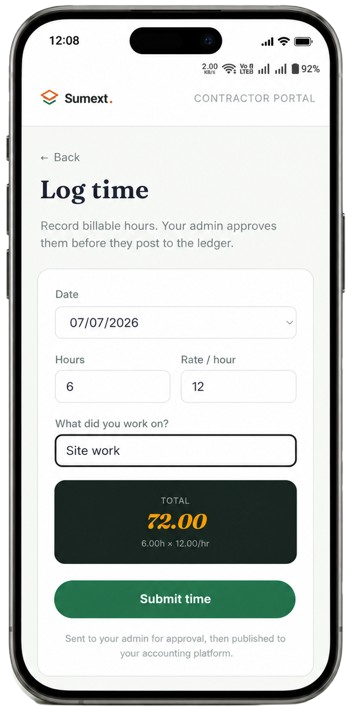
Log billable hours against a client or project, and review supplier bills with their original documents. Approved time follows a different accounting route by platform.
Use time entry for billable work, then keep routine supplier invoices and receipts in document review. These related bookkeeping tasks have separate records.
Explore time tracking NORTHSIDE STUDIOReal product screen
THE WORK, IN CONTEXTTime entered.
Time entered.
Bill details checked.
Approved time syncs to Zoho Books. For Xero and QuickBooks, approved hours export as CSV for import. Sumext does not generate client invoices from project budgets.
Explore the Sumext workflow- 01 / LOGRecord hours for a client or project.
- 02 / COLLECTBring supplier bills and receipts together.
- 03 / REVIEWCheck each record before accounting.
A CLEARER NEXT STEP
See how it fits your workflow.
Walk through a typical project routine with the Sumext team.
Book a workflow reviewBillable project hoursConsultant invoicesStudio purchasesMonthly bookkeeping prep