SUMEXT FOR CLINICS & HEALTHCARE TEAMSEvery receipt,
Every receipt,
ready for review.
Keep clinic purchases and staff claims together, with the receipt beside the details an approver needs to check.
Sample records · review before accounting BRIGHTFIELD CLINICIllustrative interface
EXPENSES TO REVIEW
2to reviewFind the next item to check.
City PharmacyRX-221 · Clinic supplies
AED 286.00Check receipt
Northside ImagingNI-058 · Equipment
AED 1,420.00Needs review
Sample only · no live accounting changes
THE PRODUCT, IN CONTEXT
Review a claim with its receipt
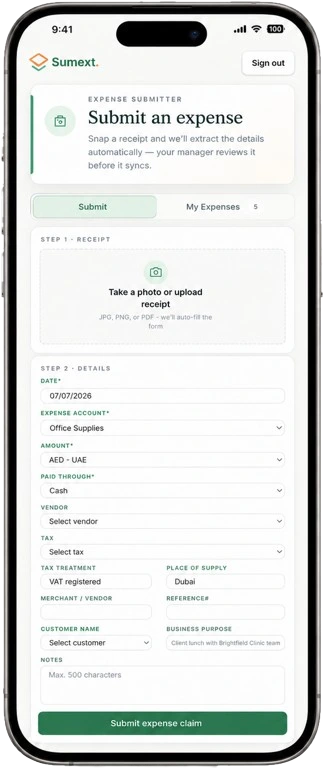
Staff can submit a claim through the restricted expense portal. Admins review and approve it before the accounting workflow and reimbursement tracking.
Check the original, amount, tax treatment and business purpose together. This sample contains no real clinic or patient record.
How approvals work BRIGHTFIELD CLINICReal product screen
THE WORK, IN CONTEXTLess chasing between
Less chasing between
clinic locations.
Expense claim approvals depend on the organisation’s role and plan. This is an expense workflow, not a medical-record system.
Explore the Sumext workflow- 01 / SUBMITA restricted portal for staff claims.
- 02 / REVIEWThe receipt stays with the claim.
- 03 / DECIDEAn admin approves before the next step.
A CLEARER NEXT STEP
See how it fits your workflow.
Walk through a typical staff claim routine with the Sumext team.
Book a workflow reviewClinic suppliesEquipment receiptsStaff expense claimsPending review visibility