SUMEXT FOR FINANCE TEAMSEvery payable.
Every payable.
A clear decision.
See bills waiting for review, resolve document exceptions, then continue through the workflow for your connected ledger.
Sample records · review before accounting SUMEXT TEST COIllustrative interface
BILLS IN THE REVIEW QUEUE
2to reviewFind the next item to check.
Test SupplierTS-2026-005 · Bill
AED 3,000.00Tax rate check
City UtilitiesCU-181 · Bill
AED 628.40Needs approval
Sample only · no live accounting changes
THE PRODUCT, IN CONTEXT
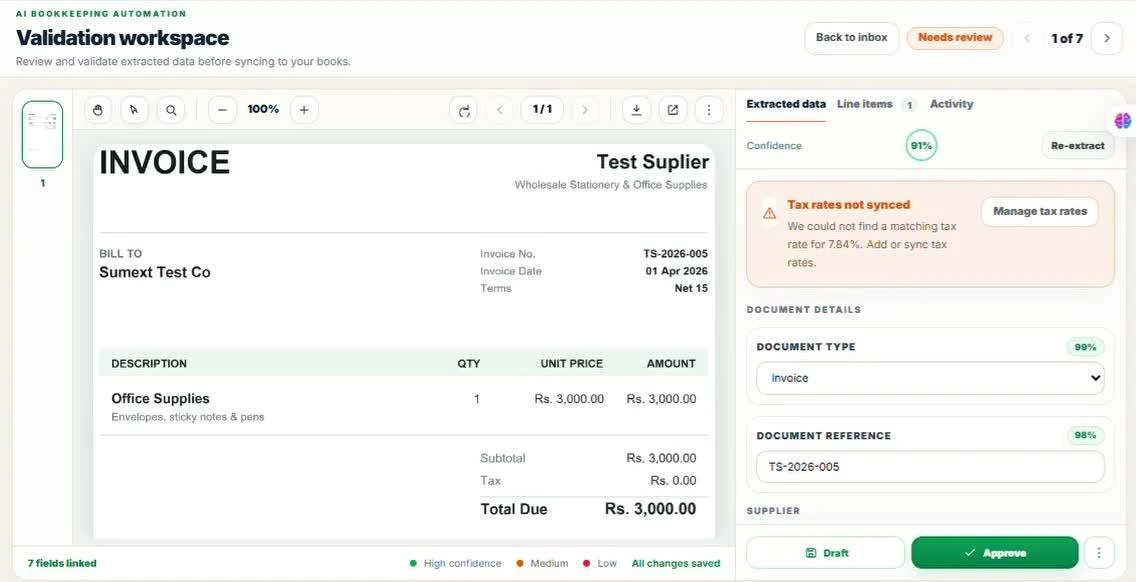
Start with the document that needs attention
See the original bill alongside extracted details. Check the supplier, amounts and tax, then resolve exceptions before making the approval decision.
The real validation workspace keeps the source document and editable details together. Approval and accounting sync are separate steps.
Approval guidance SUMEXT TEST COReal product screen
THE WORK, IN CONTEXTKeep payables
Keep payables
moving with control.
QuickBooks Online and Zoho Books require approval. Review-free processing is limited to eligible Xero bills with enabled, previously approved vendor rules.
Explore the Sumext workflow- 01 / RECEIVEUploaded, emailed or submitted documents.
- 02 / REVIEWExceptions stay beside the source.
- 03 / APPROVEFollow the connected platform’s workflow.
A CLEARER NEXT STEP
See how it fits your workflow.
Walk through a typical payables routine with the Sumext team.
Book a workflow reviewAP reviewExpense approvalsException follow-upMonth-end visibility