An admin adds the contractor's phone number; their first WhatsApp message verifies it.
WhatsApp Capture
Contractors send documents by WhatsApp. Accounts stays in control.
On Team and Firm plans, authorized contractors can send document photos or PDFs from their saved number. Each file appears in their submission history and the accounts review queue.
14-day free trial · No credit card
WhatsApp Capture · Sample workspaceReview queue
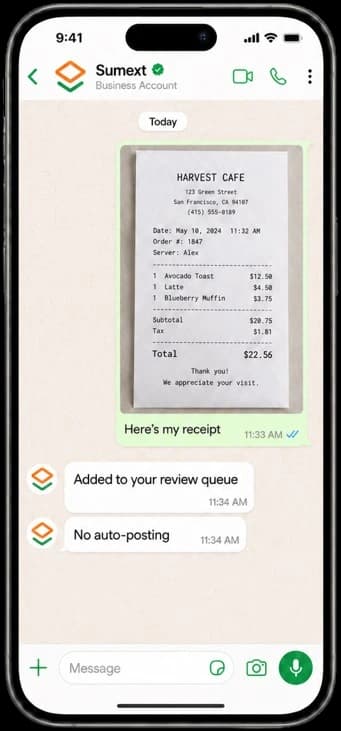
Example product screen · Sample data
The problem
Receipts should not disappear into chat.
Receipts live in WhatsApp threads and never make it to the ledger.
How it works
From WhatsApp to a reviewed entry.
The contractor sends a clear document photo or PDF to Sumext.
Sumext saves the original and links it to a contractor submission for accounts review.
Accounts approves or rejects it, then chooses the appropriate accounting action.
What makes it different
A chat message joins the controlled workflow.
The contractor's file stays attached to their submission, so accounts can see who sent it and review the original before deciding what to do next. Raw WhatsApp documents are not posted automatically to accounting.
Team includes 10 authorized WhatsApp senders; Firm includes 25. Setup requires a configured Sumext WhatsApp number.
See it in your workflow
Ready to try it?
Guided setup · 14-day free trial · No credit card