Less retyping.
More reviewed books.
Bring bills into your client’s review queue, check the extracted details, and keep the original with every decision.
Keep your bookkeeping judgment. Lose the repeated data entry.A queue you can work through.
Check the source.
Keep the decision yours.
See the bill alongside supplier, date, tax and total. Investigate exceptions before approving, with the original document available while you work.
Watch the actual validation workspace below, or open the interactive walkthrough to explore review at your own pace.
Explore source-linked review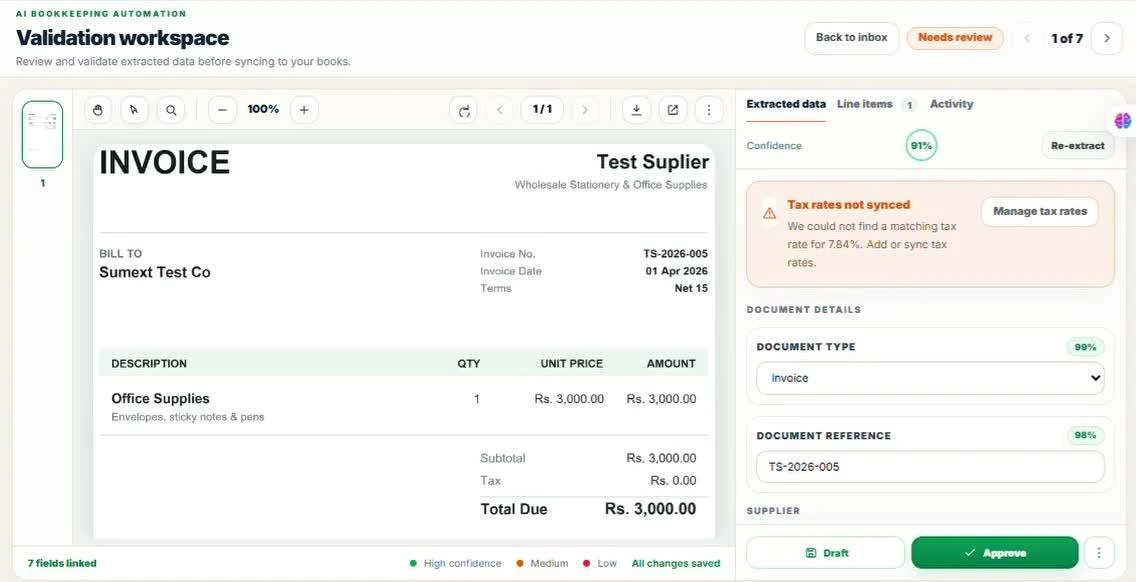
Keep the coding
you already worked out.
Saved supplier rules can reuse account and tax mappings for repeat documents in the same workspace. Review the suggestion against the new bill; a familiar supplier is not a reason to overlook a changed detail.
How supplier rules workWhen can a bill skip manual review?
Only eligible Xero documents can use enabled, previously approved vendor rules for review-free processing. QuickBooks Online and Zoho Books require approval. Email and WhatsApp captures remain in review.
Read approval guidance ↗- Account
- Printing & stationery
- Tax mapping
- VAT on expenses · 5%
- Workspace
- Northside Studio
Keep the week moving.
Make month-end clearer.
Work through supplier bills, tidy the receipt backlog, and leave a clear document status for the next session.
See how Sumext fits your clients, accounting software and review routine.
Book a workflow review Managing several client workspaces? ↗